
Mahjong Soul Integration
This module contains a few commands used to get information about Mahjong Soul, a Japanese mahjong game platform developed by Cat Food Studio and distributed, in its English and Japanese version, by Yostar. The game is available as a browser game, with Android and iOS mobile apps to be released in the future.
The game was released in 3 regions/versions:
- CN (Chinese)
- JP (Japanese)
- EN (English/Global)
Commands
/mahjongsoul status
Command Syntax
/mahjongsoul status [region:{en/jp/cn}] Command Description
Checks the status of Mahjong Soul's game servers. Omitting region defaults to en and shows the status of the English servers.
Permissions Needed
- User: None - open to everyone by default (see the Permissions System)
Examples
/mahjongsoul status
/mahjongsoul status region:cn
Server Status Live Feed
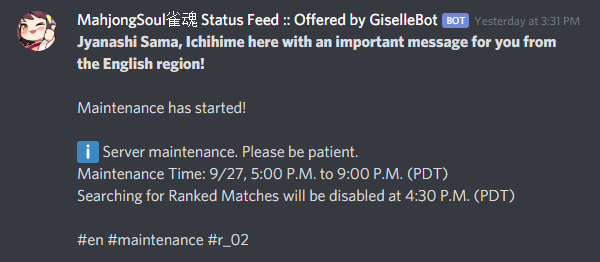
The Mahjong Soul Server Status Feed offers an easy way to monitor Mahjong Soul servers availability for any region, and be notified when something changes on one (or more) of the webhooks configured in your Discord server.
See also
In order to better understand this module, it's very important that you are familiar with Discord webhooks. For more details about this Discord feature, please take a look at this official guide.
By default, the status feed mascot will be the Mahjong Soul character Ichihime, and all of the feed messages will be Mahjong Soul-themed.
The full list of feed messages and monitored transitions can be found in this Google Spreadsheet.
Note
The spreadsheet contains a few yellow lines that are currently not used for technical reasons. These will be populated if/when they'll be applicable.
Each message will be followed by a list of hashtags, that users may use to filter the specific messages they are interested into, indicating:
- The region code whom the message refers to:
#cn#en#jp - The current status of the region, using a technical status tag:
#gateway_error#maintenance#partial_maintenance#server_outage#operational - If maintenance notes are found, the message will print the maintenance notes (and track their changes throughout a maintenance).
- The quote ID (refer to the Mahjong Soul Server Status Feed Sentences Google Spreadsheet) for the region status transition and/or server status transition: e.g.
#r_01#r_02s_02...
Feed management (dashboard)
Note
Starting, editing, listing and removing status feed webhooks is now done from your server's Mahjong Soul page on the dashboard. The concepts below still apply - only where you configure them has changed.
Warning
Discord webhooks are a very powerful feature, but they (currently) lack 2-way authentication of messages. This means that a malicious user knowing a webhook URL will be able, with some effort, to forge a message containing any kind of content using external tools and send that message to the webhook.
Feed fields
- Webhook URL: the Discord webhook the feed posts status transitions to. Set once when creating the feed - pasting a new URL later requires deleting and re-creating the feed.
- Regions: a checkbox filter for Mahjong Soul server regions (
cn,en,jp). Leave all unchecked to match every region. - Filter Words: a whitelist of one or more words or phrases that a status transition's quote text or hashtags must (or, with the "Exclude Matches" checkbox, must not) contain before it's posted, combined using the Filter Mode (AND/OR) setting below. Enter one word or phrase per line - there's no comma-separated list or quoting syntax, so a multi-word phrase like
partial maintenanceis simply its own line. Case-insensitive, partial-word matching. Leave empty for no filter. - Filter Mode:
OR(any filter word matches) orAND(every filter word must match). - Exclude Matches Instead of Including Them: inverts the Filter Words whitelist into a blacklist.
- Custom Header: replaces the default message template posted above each status transition (max 1024 characters). Supports the dynamic tags below.
- Webhook Display Name: overrides the webhook's posted username (max 32 characters). Leave blank to keep the webhook's own name.
- Do Not Overwrite the Webhook's Username / Avatar: two independent checkboxes to keep the webhook's own posted username and/or avatar untouched instead of the module's automated ones.
Permissions needed on the dashboard: Manage Webhooks (server-side)
Note
Custom headers can be formatted as embeds by following a very specific syntax. Do know that both GiselleBot and Discord are very sensitive to this specific syntax, which is easily "broken" by special characters: for this reason, using embeds as header is not suggested, nor directly supported. Use them at your own risk! If you are brave enough, I suggest the usage of this embed generator (click on the "Enable webhook mode" button at the bottom of the page).
Custom headers support a few dynamic tags that are replaced with their respective "real" value during run-time. These are:
- %region%: This will be replaced with the region name, capitalized (e.g.
Chinese,English, ...) - %region_code%: This will be replaced with the region code, uppercase (e.g.
CN,EN, ...) - %timestamp% or %timestamp_utc%: This will be replaced with the status transition UTC time, with format
YYYY-MM-DD HH:mm:ss (UTC). - %timestamp_iso%: This will be replaced with the status transition UTC time, as ISO8601 string.
- %timestamp_pst%: This will be replaced with the status transition PST time, with format
YYYY-MM-DD HH:mm:ss (PST).
Timestamp tags also support custom time zones. You can replace the utc part with either:
A different valid IANA time zone identifier (e.g. America/New_York, Europe/London).
An UTC offset, in the form of
[UTC/GMT](+/-)(hours)[:][minutes]. Here are some valid examples:%timestamp_Europe/London%%timestamp_America/Los_Angeles%%timestamp_Japan%%timestamp_PST8PDT%%timestamp_+0800%%timestamp_-10:30%%timestamp_UTC+2%
All headers will be followed by the actual quote text, including the additional hashtags.
Default header: Jyanashi Sama, Ichihime here with an important message for you from the %region% region!
Default webhook display name: "MahjongSoul Status Feed :: Offered by GiselleBot"
See also
Full migration mapping for these commands: Migration Guide.